Arc - How To Buy Zen

Welcome back to our weekly Arc Feature Spotlight. This week, we will be covering how to purchase Zen through Arc. If you are new to Arc, it is a good idea to check out our FAQ here. Once you've gotten a basic understanding of Arc, you can download it here:

Purchasing Zen
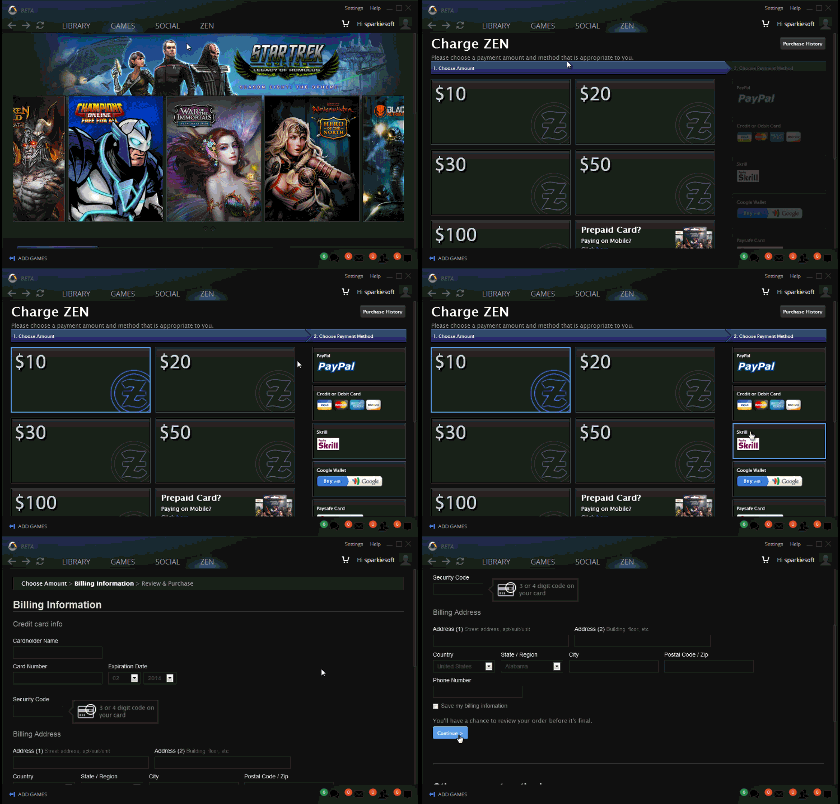
Navigate to the ZEN tab and choose the amount you wish to purchase. Once you have chosen the amount you wish to purchase, you will be prompted with a payment method. Go ahead and select you payment method and click Continue. Fill in your billing information and once that is all done, click Continue once again. After you complete this step you will then have to confirm purchase, then transfer to your game of choice.
Transferring Zen
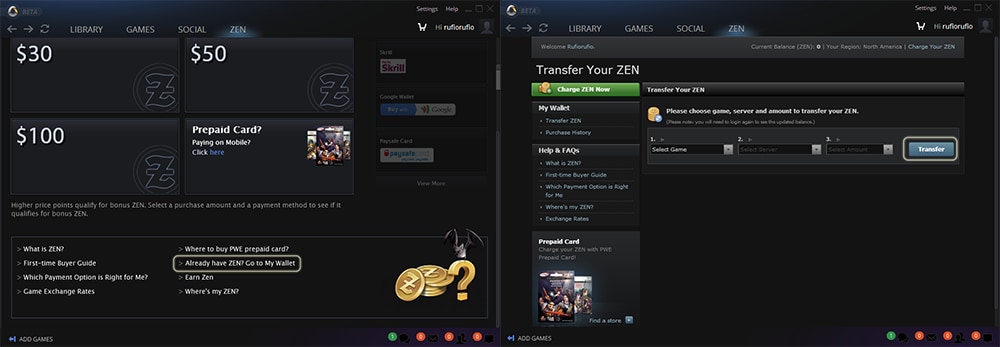
Now that you have purchased your Zen, go ahead and navigate back to the Zen Tab if you're not already there. Scroll down to the bottom of the page and click on Already have Zen? Go to My Wallet. Once you are here, simply select the game you wish to transfer your Zen, the server your character is on and the amount. Once you have those 3 criteria filled out, click Transfer and you're done!
Stay tuned next week for another addition to our Arc feature spotlight.
If you have any input, please let us know at feedback@arcgames.com.
Like us on Facebook or follow us on Twitter!
Sincerely,
Sparkiesoft and the Arc Team
Novità
-
Seguici
-
TAG popolari
dev-blog arc-news press-release arc-steam arc-patch-notes arc-upcoming